 Supersetting
See which muscle group is behind this week. Train it today.
Supersetting counts your sets per muscle group and compares them with a weekly minimum you choose. Every day a workout is ready that rounds out your week.
For iPhone with iOS 17 or later. The app is in testing on TestFlight, in English, Dutch, German, French and Spanish.
This week
3 of 10 weekly minimums reached, 37 sets to go
-
Hamstringstoday’s focus0 of 8 sets
-
Glutes0.5 of 6 sets
-
Quads1 of 10 sets
-
Abs1.5 of 6 sets
-
Calves2 of 6 sets
-
Biceps5 of 8 sets
-
Triceps5 of 8 sets
-
Shoulders10.5 of 10 sets, minimum reached
-
Back13 of 12 sets, minimum reached
-
Chest11 of 10 sets, minimum reached
Back today, legs tomorrow
If you train five or six times a week, your focus shifts from day to day. A workout log stores that per session. Adding it up per muscle group across the week is left to you, and that is more work than it seems: a set of bench press also works your triceps and shoulders, and warm-up sets shouldn’t count.
So you pick by feel at the gym, and only notice months later that something is off. When all you really want to know is three things.
- Which muscle group is falling behind?
- Have you done enough this week?
- What should you train today?
A suggested workout every day
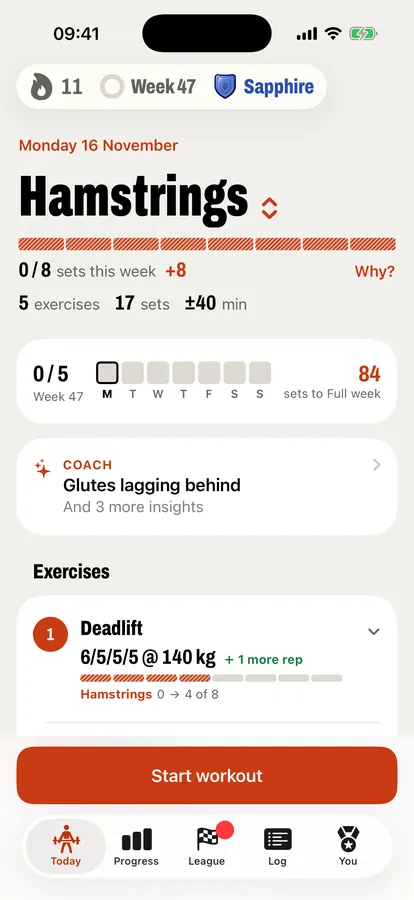
The Today tab has a workout ready. Its focus is the muscle group that is furthest behind its weekly minimum and has had enough rest: fewer than four sets in the past 36 hours. The app then adds muscle groups that are still below their minimum.
Each exercise shows why it is there, and below the plan you see what was left out on purpose. You can pick the focus yourself and swap exercises.
Progression
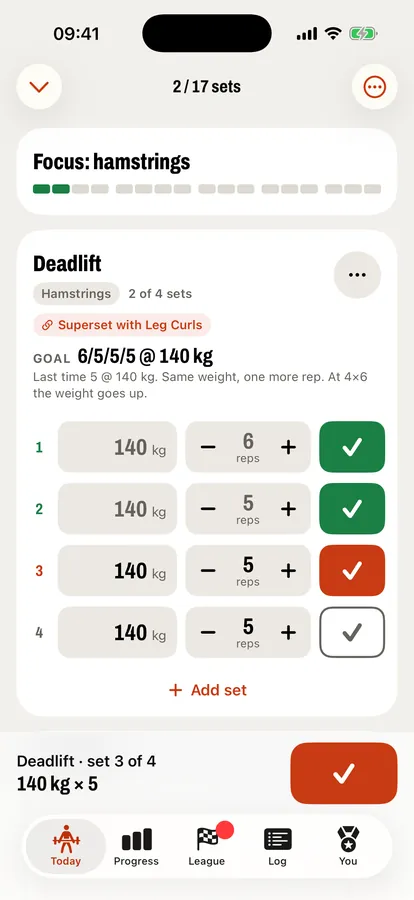
Weights and reps come from your previous workouts. First you add a rep. Once you reach the top of the rep range on every set, the weight goes up by a step that fits the weights you already use. Fall below the range twice and it drops by 10%.
Your week per muscle group
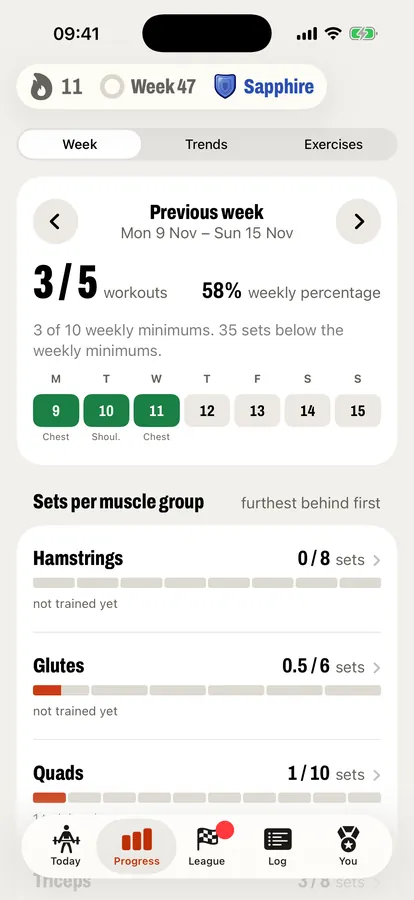
For each of the ten muscle groups you set a weekly minimum and a target, or use the recommended values. A set counts in full for the muscle group it trains and as half for the muscle groups that assist. Warm-up sets don’t count.
The share of your weekly minimums you have reached is your weekly percentage, shown at the top of every tab. At 100%, every muscle group has had its minimum. How to choose those minimums is explained in How many sets per muscle group per week?
Analysis
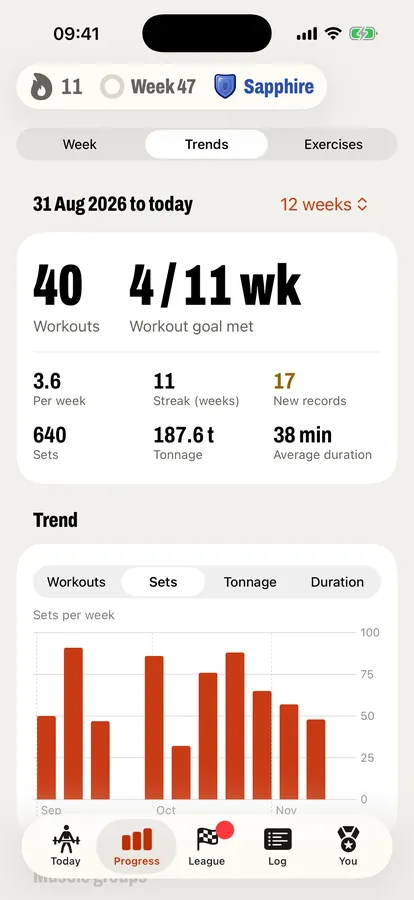
Trends shows your workouts, sets, tonnage and records over several weeks, and for each muscle group how many weeks you reached the minimum.
Every week counts
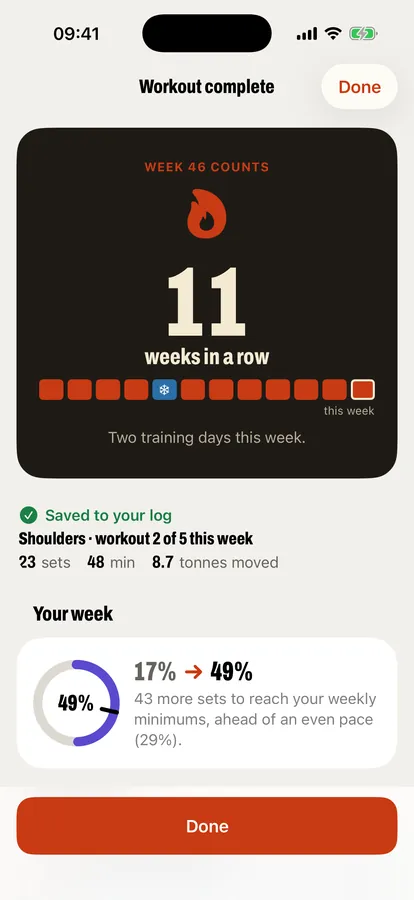
A week counts toward your streak once you have trained on two days. The flame at the top stays grey until then and turns orange after. On the workout that makes your week count, the summary celebrates it: “Week 46 counts.”
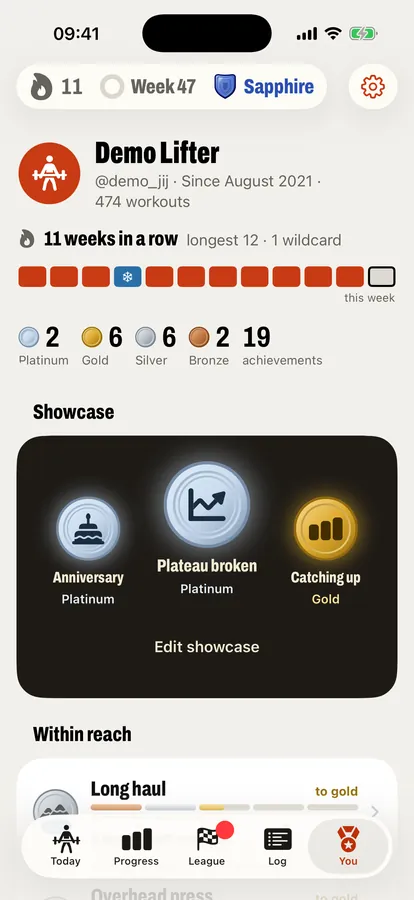
An easy week you plan keeps your streak intact. And for every four weeks that counted you earn a wildcard, up to two. If a week doesn’t work out, because you are ill for example, the app uses one automatically. Nothing is for sale.
Week wrap-up
The first time you open the app after your week has ended, you see the result: your weekly percentage, how many muscle groups reached their minimum, and your streak. If you like, you get that result as a notification on Monday.
Medals
The You tab holds your achievements, for consistency, balance between muscle groups, progress, milestones and the weekly league, plus two secret ones. Most have five levels: bronze, silver, gold, platinum and legend. You pick three for your showcase, and Within reach shows the ones you have almost earned. Strength medals for the deadlift, squat, bench press and overhead press compare your estimated max with your own body weight.
A weekly league, if you want one
The community is optional. You sign in with Apple, choose a username and an avatar, and see other members’ profiles and medals. There is no chat, no feed and no photos.
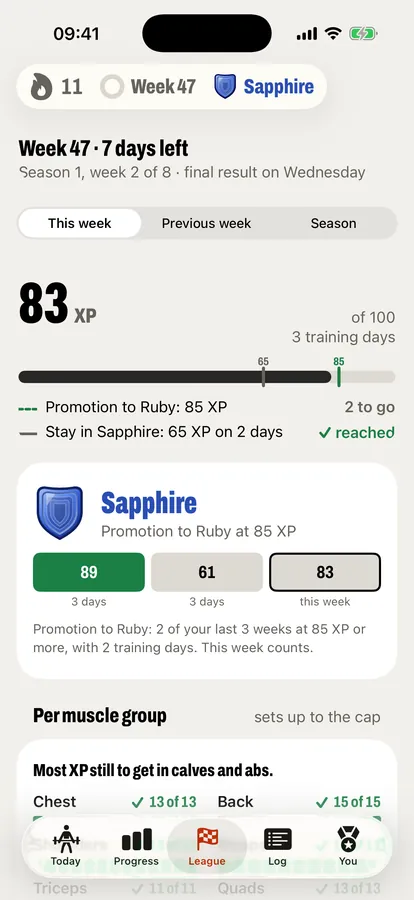
In the weekly league you earn XP every week, from 0 to 100, from your sets per muscle group. The first sets count most, and nothing counts above a cap per muscle group. Each day, at most 10 sets per muscle group and 40 sets in total count, so 100 XP, a top week, takes at least three training days. Only workouts you do in the app count. Consistency wins, not the heaviest weight.
Ten divisions
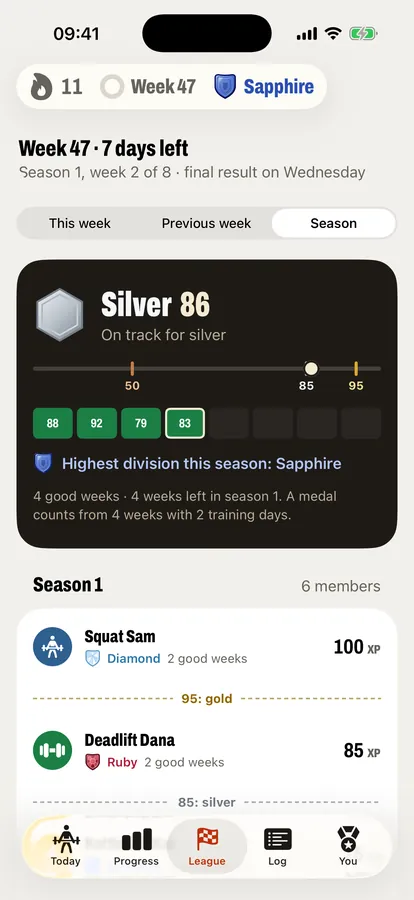
Everyone starts in Stone. Above it are Iron, Steel, Titanium, Quartz, Jade, Amethyst, Sapphire, Ruby and Diamond, each with its own line from 15 to 95 XP. When a week reaches the line of the next division on at least 2 training days, and 2 of your last 3 weeks did, you move up one division. Nobody pushes you down: you only drop after two weak weeks in a row, below your stay line or with fewer than 2 training days. Train twice a week and you end up around Jade, three times around Sapphire, four times around Ruby. Diamond takes five workouts a week, or four of 20 sets.
Eight-week seasons
Each new season you start one division lower. After a season you get a season medal: bronze from 50, silver from 85 and gold from 95, based on your average XP over your best three quarters of the weeks. A medal counts from four weeks with two training days. During the season, League shows what you are on track for.
Strong and the strength ladder
After a league week you can give a member one Strong: a fixed reaction, without text. The strength ladder shows where members stand on each lift, by level only, never with kilos or body weight.
Your workouts stay on your iPhone. For the weekly league, only counts per day go to the server: your sets per muscle group, your workouts and their minutes. The screens shown here use demo members.
A coach on your iPhone
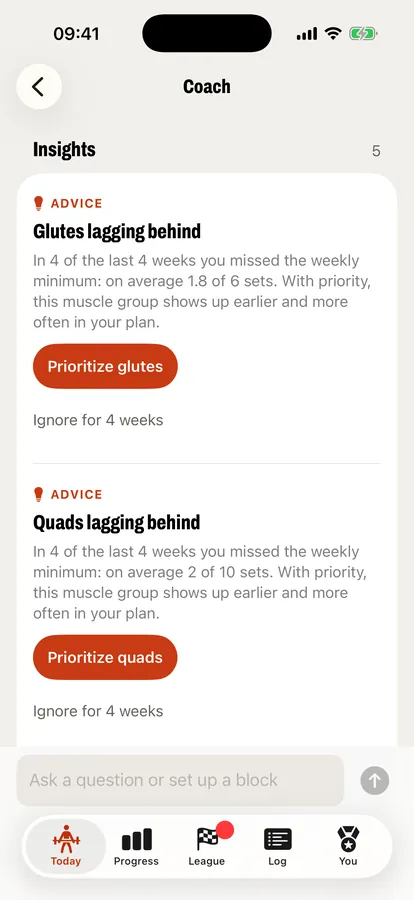
The coach card on Today shows the most important thing to look at: an exercise that has stalled, a muscle group that keeps falling behind, far more pushing than pulling, or time for an easy week. Tap the card to open Coach, where one button gives that muscle group priority in your plan. This works on any iPhone.
With Apple Intelligence you can also ask the coach about your own training, have it summarize your week, or type a wish for today, such as “only 30 minutes” or “no barbell”. You can also set up a block: a few weeks of extra attention for one body part, or a build-up to a 1RM on one exercise.
The language model runs on the iPhone itself. The numbers come from the app’s own calculations.
The coach with Apple Intelligence needs iOS 26 or later and an iPhone that supports Apple Intelligence, such as iPhone 15 Pro or iPhone 16 and later.
Also in the app
After each workout
What share of your weekly minimums is now done, what the workout added per muscle group, your records and the exercises that went better than last time.
Log
All your workouts with exercises, sets, weights and reps. If you connect Apple Health, you also see your strength workouts from Health there.
Widget
“Streak and week” on your Home Screen or Lock Screen: the flame with your streak, whether you trained today, your workouts this week against your goal and the focus that is ready.
Three goals
Bodybuilding, powerlifting or general fitness. For powerlifting, squat, bench press and deadlift run 5 × 5, in steps of 2.5 kg.
Notifications
If you want them: a reminder before your usual training time, your weekly status after a workout, your weekly result on Monday and at most once a week “one more training day”. The app schedules them on your iPhone itself.
CSV import
Using another training app now? Import your history from a CSV export, so Supersetting knows your weights from day one. Support lists which export works.
Read more
- How many sets per muscle group per week?What research says about training volume, and how to plan a weekly minimum per muscle group.
- Frequently asked questionsWhat the app does and doesn’t do, what it costs, where your data lives and how the weekly league scores.
- Supersetting comparedAn honest comparison with workout logs such as Strong and Hevy and planners such as Fitbod.
Your workouts stay on your iPhone
You don’t need an account. Your workouts are stored in the app on your phone and nobody else can see them, the developer included. If you join the community, you share only your profile and achievements with other members.
- No account needed; the community and the weekly league are optional.
- No analytics, ads or tracking.
- The coach runs on the device.
- Connecting Apple Health is optional.
- Notifications are scheduled on your iPhone.
Become a tester
Supersetting is in testing on TestFlight, Apple’s app for test versions. Wanted: people who lift weights at least three times a week and decide day by day what to train.
What you need
- An iPhone with iOS 17 or later: iPhone XS, XR, SE (2nd generation) or newer.
- English, Dutch, German, French or Spanish as your iPhone language.
- For the coach with Apple Intelligence: iOS 26 and an iPhone that supports it. Without it, the rest of the app works as usual.
What the test asks
Log your workouts in Supersetting for three weeks, check off every set, and give short feedback twice.
The plan is that the first testers will later get a permanent founding member badge in the app.
Not for you if you
- use Android, or want the app on an iPad or Apple Watch;
- want your data on several devices or in the cloud;
- mostly do cardio, running or group classes;
- follow a fixed program from a trainer and don’t want to deviate from it.
Sign up
- Install TestFlight, Apple’s app for test versions, from the App Store.
- Open the test link below on your iPhone and install Supersetting.
- Train with the app for three weeks and send feedback with a screenshot through TestFlight.
If the link doesn’t work yet, Apple is still approving the test version. Try again a day later, or email your sign-up:
Email your sign-upYour email address is only used for the test.